
Hello and welcome to our May 2026 newsletter from HazWasteOnline™, if you would like to discuss anything in the newsletter please do contact us through our contact information found in the footer of this newsletter. The topics discussed this month are:
- HazWasteOnline new features:
- Mass corrections
- Sample Manager
- ECHA CHEM replaces ECHA C&L
- Review of green-dot substances
- Copper particles
- When is 17 05 soil and stones not 17 05 soil and stones?
New HazWasteOnline™ feature – Mass Corrections
For any material removed from a sample either;
- during field sampling where, for example, cobbles are not included in the sample,
- by the lab where material >10mm sieve is removed and not tested, or
- where metal articles (cutlery, screws, coins etc.) are removed from an incinerator bottom ash before the ash is tested,
A mass correction can be applied to account for this removed material.
Corrections can also be used to correct lab results for the mass of objects such as:
- a metal paint can containing a (non-removable) residue
- a steel beam painted with an anti-corrosion coating containing a zinc dust based paint.
The effect of the correction (much like the moisture correction) is to lower the concentrations of the substances you have measured which might change a hazardous result to non-hazardous.
There are four mass correction functions available in HazWasteOnline™ Packages and Expert Editions. A mass correction is a user defined determinand and has to be created in the waste stream template tool. Click on the magic wand drop-down tool and select, wordsmith and save the relevant correction. Once created, users can also add the new determinand into a Job by using the ‘Add determinand…’ feature.
.
The four scenarios:
- Case 1 – where a % of material has been removed from the sample before being sent for laboratory analysis. For example;
- A soil is screened to remove material above 10mm; only a sample of the sub 10mm material is sent to the laboratory for chemical testing.
- Case 2 – where a % of the material, received by the laboratory, has been removed from the sample by the laboratory, before any analysis is undertaken. For example;
- A laboratory may remove any lumps of metal.
- Case 3 – where the laboratory, after drying the material, has either
- crushed everything, or
- used a sieve to separate out and weigh all material above, for example, a 10 mm sieve, and then;
- Subsequently crushed this material and included it in the analysis
- Has not crushed the material but has mathematically corrected the analysis for the mass removed
- Case 4 – where a laboratory, after drying but before grinding, has used a sieve to separate out all material above a certain size (and weighed it) and has not corrected the analysis for this removed material.

Figure showing the addition of a Case 1 mass correction: fields such as the Name and Comments are customizable and allow the classifier to accurately describe their mass correction for the specific waste stream.
For further details on mass corrections, HazWasteOnline™ users may read our help page found here: https://app.hazwasteonline.com/help/substancekb/mass_corr
New HazWasteOnline™ feature – Sample manager
HazWasteOnline™ has introduced a Sample Manager tool, available in the Packages and Expert editions. The Sample Manager can be found in the Job interface. Clicking the  button will bring up a box where users can easily manage their samples, including:
- Re-arranging the order of your samples
- Inputting the depth of your samples
- Adding more or deleting samples
- Renaming your samples
- Exporting selected samples into a separate Job

ECHA C&L inventory database replaced by ECHA CHEM
The ECHA C&L inventory was a chemical database documenting information on chemicals from all REACH registrations, classification and labelling regulatory lists and processes under REACH, CLP, DWD and POPs regulations. As of 18th December 2025 this has been replaced by ‘ECHA CHEM’.
Why does this matter for classifiers?
To complete a classification, users may need to ‘self classify’ a substance. Self classification is required where the substance you need to assess is not present in HazWasteOnline™. For these cases, the user has undertake a research exercise which usually entails reviewing data sources such as ECHA CHEM and REACH complaint Safety Data Sheets.
Once the data (hazard statements, CAS number etc) have been gathered, the missing substance can be added to HazWasteOnline™. This is accomplished by adding a New User Determinand to a waste stream template:

An important part of self classifying a determinand is documenting the hazard statements for it; this is where databases like ECHA CHEM are used to research this information. ECHA CHEM will contain lots of information on the determinand but classifiers will want to navigate to ‘Industry self-classifications’ where they can find notifications of hazard statements for the substance from REACH registrations and CLP notifications.


The above pictures show the use of ECHA CHEM for the substance barium oxide.
Review of Green-Dot substances
We have just completed a review of more than 60 substances marked with a green dot in HazWasteOnline™. Green dot substances are substances that we have either added (e.g. fluorene) or modified by adding a missing hazard property (e.g. lead compounds and HP7). The vast majority of compounds have not changed in terms of their hazard statements but now refer to data from the ECHA CHEM database (not the now closed C&L database) and to current SDS from the likes of Sigma Aldrich.
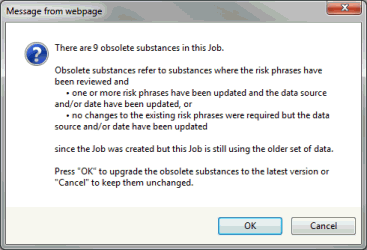
The impact of this change is that the next time you open a Job or utilise an in-house waste stream template, you will be warned in a pop-up window that the Job contains one or more “obsolete substances” . The pop-up will ask you to click OK to accept the changes or cancel to decline making the changes at this time.
- If the Job is a current Job, you should click OK
- If the Job is an old Job (ie report has been issued/utilised), you can decline to make any changes and leave in its original state. Obsolete substances are marked by a brown flag
.
You should also review all in-house waste stream templates and update them. Simply open the templates one by one and accept the update. Otherwise every time you open a new Job, based on one of those templates, you will be asked to update obsolete substances.
Copper particles
The addition of the determinand: copper [specific surface area > 0.67 mm2/mg] to both the EU CLP (June 2024) and the GB CLP (September 2025) presents a new challenge to the classification of many waste streams that contain copper particles.
In toxicological studies, Specific Surface Area (SSA) refers to the total surface area of a material — such as a particle or powder — per unit of mass. SSA is a key parameter because it determines how much of a toxic material can interact with biological tissues or surfaces. As particle size decreases, the SSA increases dramatically for a given mass, leading to greater potential for chemical reactivity, adsorption, and biological interaction.
Applying the SSA of 0.67 mm2/mg and density 8.96 mg/mm3 (8,960 kg/m3) for copper, defines the following “shapes”:
- A solid sphere of copper (particles) of diameter 1 mm or less.
- A solid cylinder of copper of diameter 0.67 mm or less. For example, copper wires in ethernet and ribbon cables are ~ 0.1mm in diameter.
If the concentrations of these copper particles alone, exceed 2,500 mg/kg, they will make the waste hazardous by HP14 Ecotoxic.
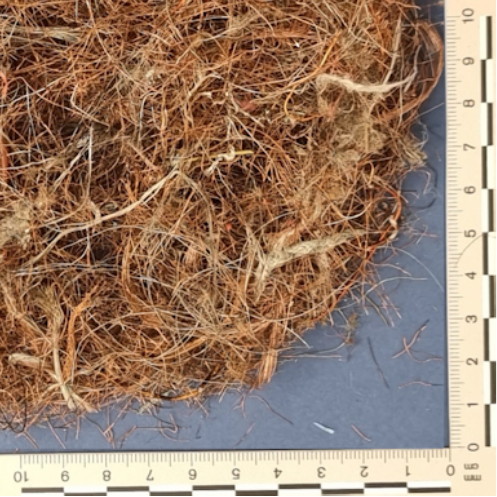
Figure showing fine copper wire removed (manually) from a heavy plastics waste stream after metal recovery.
This determinand impacts a number of wastes streams, such as:
- 19 01 wastes from incineration or pyrolysis of waste
- Incinerator bottom ash from municipal waste
- 19 10 wastes from shredding of metal containing waste
- Vehicles, wiring looms
- 19 12 wastes from the mechanical treatment of wastes including the recycling of, or recovery of, metals from
- Waste Electrical and Electronic Equipment (WEEE)
- Cables
- Heated windscreens
The impact is that waste streams that were previously classified as non-hazardous, that contain copper particles, will need to be re-assessed.
When is 17 05 soil and stones not 17 05 soil and stones?
The mirror entry List of Waste code 17 05 03* / 04 soil and stones is often applied incorrectly to soil-based waste streams. This code is meant to be applied to natural soils and stones and not soils containing anthropogenic material such as bricks, concrete, tarmac, glass, asbestos etc. Strictly, natural soils containing more than incidental amounts (i.e. an occasional piece) of anthropogenic material should be considered a mixed waste. There is no de-minimis level for contamination of other wastes within single waste streams such as 17 05 04.
WM3 does provide one example of a mixed waste. This is the case where the soils also contain visible fragments of asbestos – this mixed waste has to be dual coded as 17 05 03* or 17 05 04 (depending on the testing of the soil’s chemistry) and 17 06 01* for the fragments of asbestos.

A recent Environment Agency Waste Audit Report contained some further clarification.
If the waste is genuine natural soil, with inclusions of whole bricks, lumps of concrete for example, there is a case for applying 17 05 03*/04 [soil and stones] and 17 01 07 [mixtures of concrete, bricks, tiles and ceramics] (or 17 09 03*/04 [mixed construction and demolition wastes] if other C&D wastes are present).
The test is whether the wastes are separately identifiable.
If the mixing of the wastes has resulted in the presence of a granular fraction of anthropogenic waste being present throughout the ‘soil’ it cannot be 17 05 03*/04 and must be coded as 17 09 03/04 because the soil and anthropogenic wastes cannot be separately identified and segregated reliably.
Note – if the classifier wishes to apply multiple coding, the relevant codes in 17 01 [Concrete, Bricks, Tiles and Ceramics], 17 02 [Wood, Glass and Plastic], and 17 09 [Other Construction and Demolition Wastes] should be used.
If the waste is ‘made ground’/’hardstanding’ rather than natural soil, the mixture is either the single code of 17 09 03*/04, or where multiple coding is applied, 17 01 06*/07 and 17 09 03*/04.
The removal of larger anthropogenic fractions (e.g. bricks) from a mixture of ‘made ground’ coded as 17 09 03*/04 does not result in 17 05 03*/04 because the resulting granular waste will still be a mixture of natural and anthropogenic wastes.
The only mixed waste codes actively managed by HazWasteOnline™ are the soil and asbestos codes demonstrated above (where you also have to add a nominal concentration of the asbestos in the ACM fragments to your Job). To capture other mixed waste codes, the subsidiary codes could either be documented in the Comments section of the Details tab or separate Jobs created using the relevant LoW code(s).
You must also consider whether the anthropogenic material could be hazardous; for example bricks contaminated by mercury and test accordingly.